

Google Stitch is one of the quickest ways to get from an idea to a polished set of screens: describe the site, refine it in a few prompts, and you have a home page, an about page and a contact page that look like a studio designed them.
Then the practical question arrives: where does it live? If you or your client want to change words, swap photos, publish posts and read form messages without touching code, the answer is usually WordPress. This guide shows how to get a Stitch design there with the design intact.
What Stitch Actually Gives You
Stitch can export a screen’s code: an HTML page styled with Tailwind CSS utility classes. That matters, because HTML is exactly what a browser—and WordPress—can show without a build step. Unlike a React app, there is nothing to compile: the page you see is the page in the file.
Before you export, check three things:
- Export every screen you want as a page—home, about, services, contact—not just the first one.
- Name the files after the pages (
index.htmlfor the home page, thenabout.html,contact.htmland so on) and put them in one folder. - Keep any pictures you downloaded next to the HTML (an
images/folder is fine), then zip the folder.
The Usual Ways to Put It on WordPress
| Approach | What you get |
|---|---|
| Paste it into a Custom HTML block | The page shows, but every word and picture is locked inside code. Fine for a quick test, not for a site someone edits. |
| Rebuild it in a page builder | Editable, but you recreate every section by eye. Tailwind’s utility classes don’t map onto builder widgets, so spacing and type drift. |
| Have a developer write a theme | Faithful if done well, but slow and expensive for a design that already exists. |
| Import it with Kerf | The same HTML, the same Tailwind classes and the same scripts, as blocks you edit in WordPress’s own editor. |
Importing a Stitch Export with Kerf
Kerf is a WordPress theme with an importer built in. It doesn’t translate your design into its own widgets: almost every element becomes one block that renders exactly that element, with its own tag, classes and attributes.
Step 1: Drop in the ZIP and Read the Check
Open Kerf → Import design and drop in your ZIP. Before anything is written to your site, Kerf counts the pages, stylesheets, scripts and pictures it found and flags any file the HTML refers to that isn’t in the ZIP—so a missing picture shows up here, not after launch.
Kerf → Import design — the check before importing
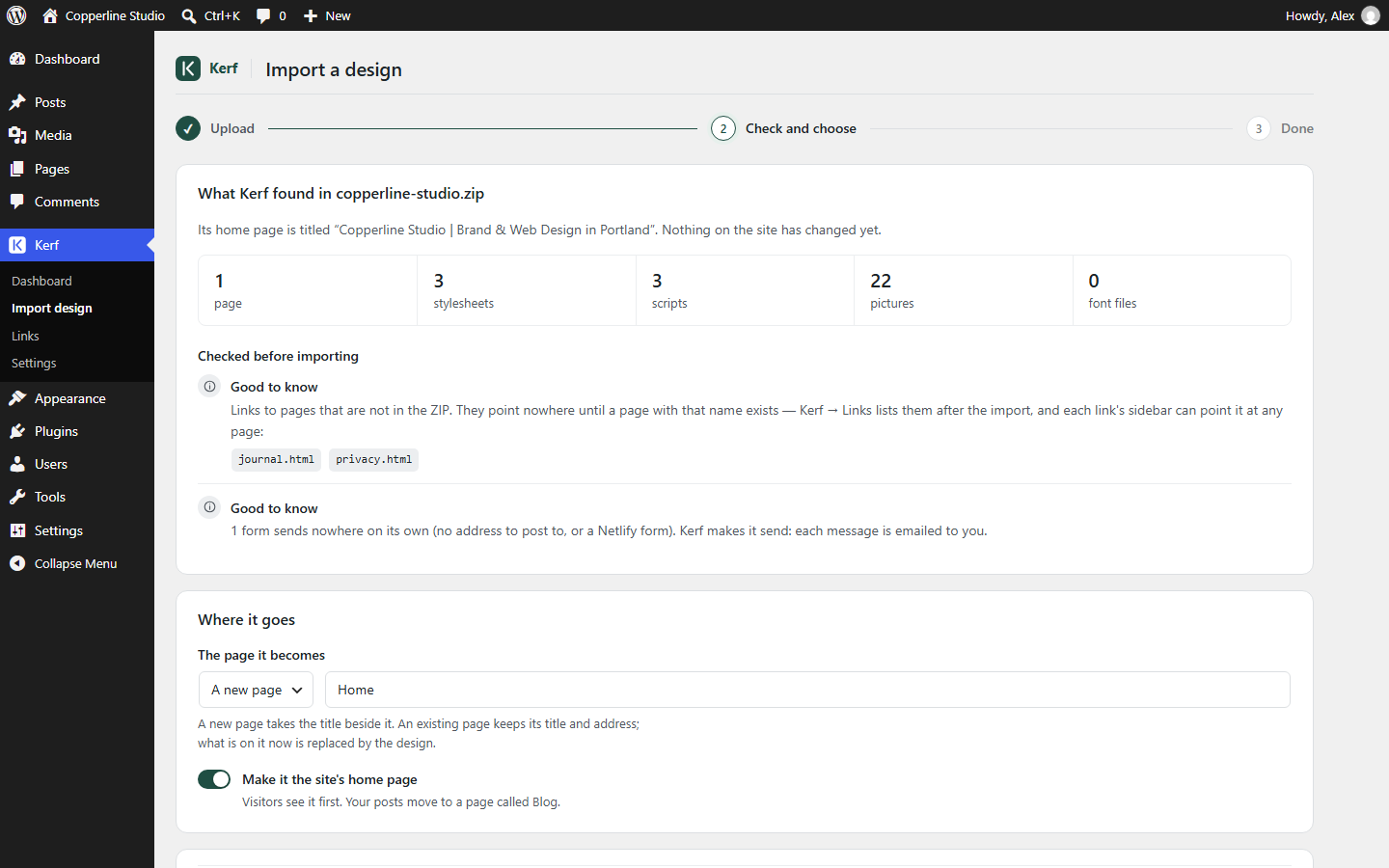
The check runs before anything changes on your site. (Shown with our Copperline Studio sample.)
Step 2: Import the Whole Site
With the default scope, Whole site, the header and footer of index.html become your site’s shared header and footer, index.html becomes the front page, and each other HTML file becomes a WordPress page (or a template, if it is a blog or post layout). Stylesheets and scripts—including a Tailwind script tag, if your export uses one—load in the same order the HTML gave them.
Step 3: Point the Menu at the Right Pages
Screens designed one at a time often have menu links that go nowhere (href="#"). Kerf leaves # links alone, so after the import select the header, open the Menu panel in the editor sidebar and point each item at its page. Links written as file names (about.html) are matched to pages automatically, and Kerf → Links lists any that still need a destination—with a Create page button for each.
Step 4: Edit It Like Any WordPress Site
Open a page in the block editor and you see your Stitch design, with its stylesheets loaded in the editor canvas. Click a heading to retype it, click a picture to swap it from the Media Library, and a contact form already sends email and saves each message under Kerf → Form entries.
Tip: One Header for Every Screen
Because the home page’s header and footer become the shared ones, the import is cleanest when every Stitch screen uses the same header and footer. If Stitch varied them, ask it to make them identical before you export.
Try Your Own Stitch Export, Free
You can test this with your own design before deciding anything: Try it free in your browser opens a private WordPress with Kerf installed—no sign-up, nothing to install. Drop in your Stitch ZIP, then close the tab and it’s gone.
Originally published on kerf.site. Try Kerf free in your browser — a private WordPress with Kerf installed, no sign-up: https://kerf.site/demo/
Comments
Join the discussionNo comments yet. Be the first to comment.